Trials mode
Anime Zero Trials Guide: Floor Clears and Class Unlocks
In regular Trials, you clear waves, take the elevator to the next floor and work toward class rewards. If you are chasing a fighter such as Void Arbiter or Astral Blossom, check its card in the Classes menu before starting the run.
Last updated · Sources reviewed
Open regular Trials and choose your goal
Select Trials in the lobby. This is the mode with Classes cards and a climb through enemy rooms. Choose Zodiac Trials when you want the raid with the encounter wheel instead.
Open Classes before choosing a party. October gameplay shows class cards with separate clear targets and party labels. Old footage and older update notes disagree on some room or floor counts, so write down the exact wording on your current card.
| Your goal | What to check first |
|---|---|
| Astral Blossom | Read the co-op condition on the Classes card and check how many players the current lobby requires. |
| Silver Calamity | Read the current solo condition and whether the card counts a floor or room. |
| Void Arbiter or Inferno Prince | Find the named card and follow the listed clear target and party rule. Check whether the card uses climb progress or leaderboard placement. |
| Coins or materials | Compare the current room reward preview and an actual clear result before committing to a long push. |
Clear the arena and use the elevator
In the recorded Update 3 run, enemies spread around the arena. Gather what you can safely group and clear packs with your area skills. Watch for the elevator prompt after the room is clear. The older interface shows an Ascend button and a keyboard prompt, so use the control your device displays.
The run footage shows a boss wave followed by a victory panel. Leave enough health and a reliable boss attack for the final fight. When trying a harder climb, record where you first lose consistency and improve the part of your rotation that failed there.
Claim the fighter and review the result
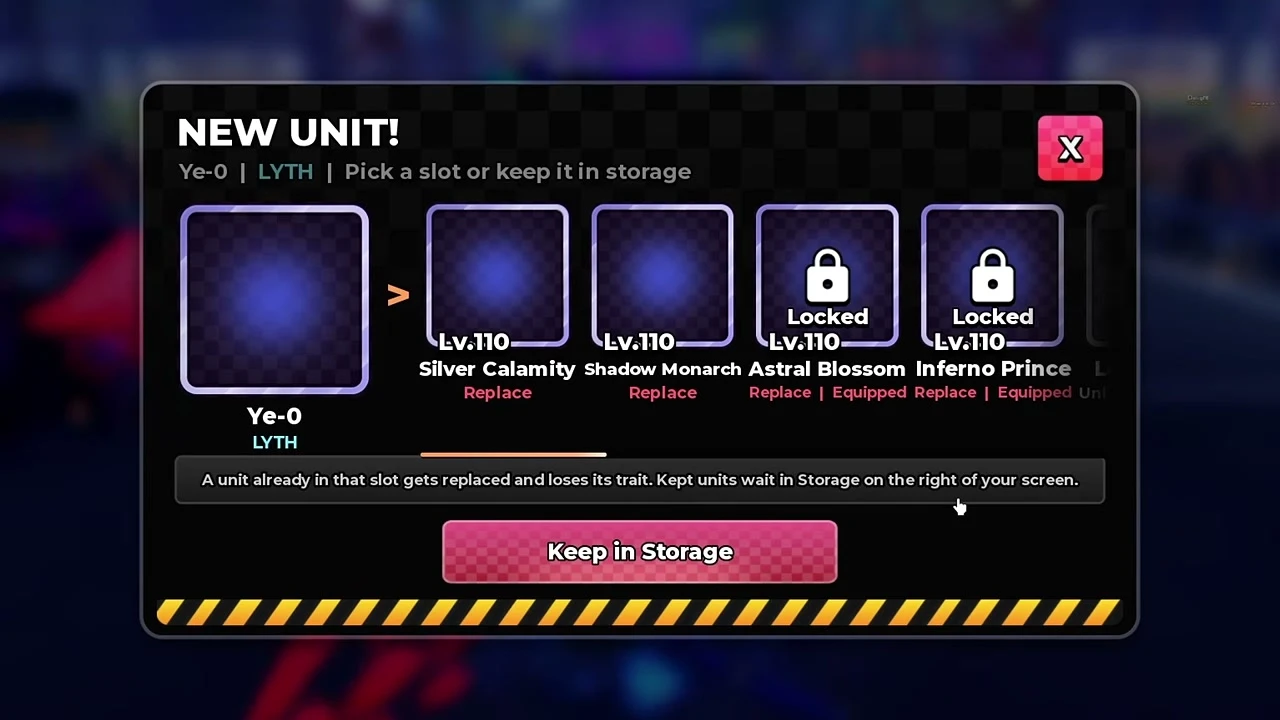
- If a New Unit panel appears, read the destination slot before confirming. The October 14 Ye-0 reward screen warns that choosing an occupied slot replaces the fighter and removes its trait. Select Keep in Storage to save the reward while preserving your current fighter and trait.
- Check the final result for the credited clear, Coins and materials. Keep that result separate from the preview in the lobby so you can compare your actual runs.
- Open the fighter’s upgrade or Evolution panel after unlocking it. The Classes reward gets you the fighter. Its build and awakening can have their own material requirements.
Decide when to climb again
If you are targeting a class, keep the correct party setup and measure progress against its card. If you are farming, compare two complete attempts on the same route. Count lobby time and failed runs, and check whether a Story route yields the same material faster.
Sources
- Roblox · Anime Zero by LY*, current game modes
- AkumaBlox · October 11, 2026 · In-game Update 3 log
- AkumaBlox · Trials Classes cards at 0:52–1:45
- AkumaBlox · Room reward panel at 4:35
- AkumaBlox · Room clears, elevator and boss sequence at 6:51–8:24
- YukiSw · October 12, 2026 · Astral Blossom and Trials panels
- Clover1x · October 14, 2026 · Ye-0 reward screen and Keep in Storage
- Published frame notes · October Trials panels and conflicting unlock readings